Elevate Intercompany
Overview
Elevate Intercompany automates the flow of sales orders, shipments, invoices, returns, and cost adjustments between separate Business Central companies. Instead of manually re-keying documents between a sales company and one or more supply companies, the extension handles the entire cross-company lifecycle in the background, including retry logic, reconciliation, and cost propagation.
Key benefits:
- Eliminates duplicate data entry across companies.
- Supports cross-tenant and multi-company deployments via secure OAuth connections.
- Automatically creates mirrored documents on the supply company when the sales company posts shipments or invoices.
- Propagates cost adjustments and item charges back from the supply company to the sales company.
- Provides real-time visibility into job status, SLA compliance, and failure rates through a built-in operations dashboard and reconciliation queue.
- Allows flexible invoicing: post each invoice immediately or group them into periodic batches per partner.
Feature Guides
Note: Feature-specific guides are not yet available in this folder. As individual guides are added (for example, setup, sourcing, invoicing, reconciliation), they will be linked here automatically on the next documentation refresh.
Key Concepts
| Concept | Description |
|---|---|
| Sales Company | The Business Central company that takes orders from end customers and initiates intercompany activity. |
| Supply Company | The Business Central company that holds inventory and fulfils orders on behalf of the sales company. |
| Hybrid Company | A company that acts as both a sales company and a supply company. Requires special permission to enable. |
| IC Partner | A configuration record that pairs a sales company with a supply company and stores connection details, invoice mode, tax treatment, and alert overrides. |
| IC Item Source | A mapping that tells the extension which supply company fulfils a given item. |
| Item Code Map | An optional translation table used when the sales company and supply company use different item numbers for the same physical product. |
| IC Job | A queued unit of work (shipment, invoice, return, credit memo, or cost propagation) that the dispatcher sends from one company to another. |
| Dispatcher | A background scheduler that picks up pending IC Jobs and sends them to the target company via API. Only one company in the group should run the dispatcher. |
| IC Application Link | A ledger-like record that tracks the cross-company document pairing, quantities, costs, and exchange rates for every intercompany transaction. |
| Reconciliation Queue | A filtered view of IC Jobs in Retrying or Failed status, used by operations staff to investigate and resolve problems. |
| Immediate Invoice Mode | Each posted sales invoice on the sales company triggers an individual matching invoice on the supply company. |
| Grouped Invoice Mode | Posted sales invoices queue up until a user (or scheduled job) runs the grouped-invoice batch, which consolidates all pending invoices per partner into a single supply-side entry. |
| Cost Propagation | The process by which the supply company sends cost adjustments (including item charges) back to the sales company so that the sales company's item ledger reflects the true landed cost. |
| SLA Latency | A configurable threshold (in seconds) that triggers alerts when an IC Job takes longer than expected. Can be set globally or overridden per partner. |
How It Works
-
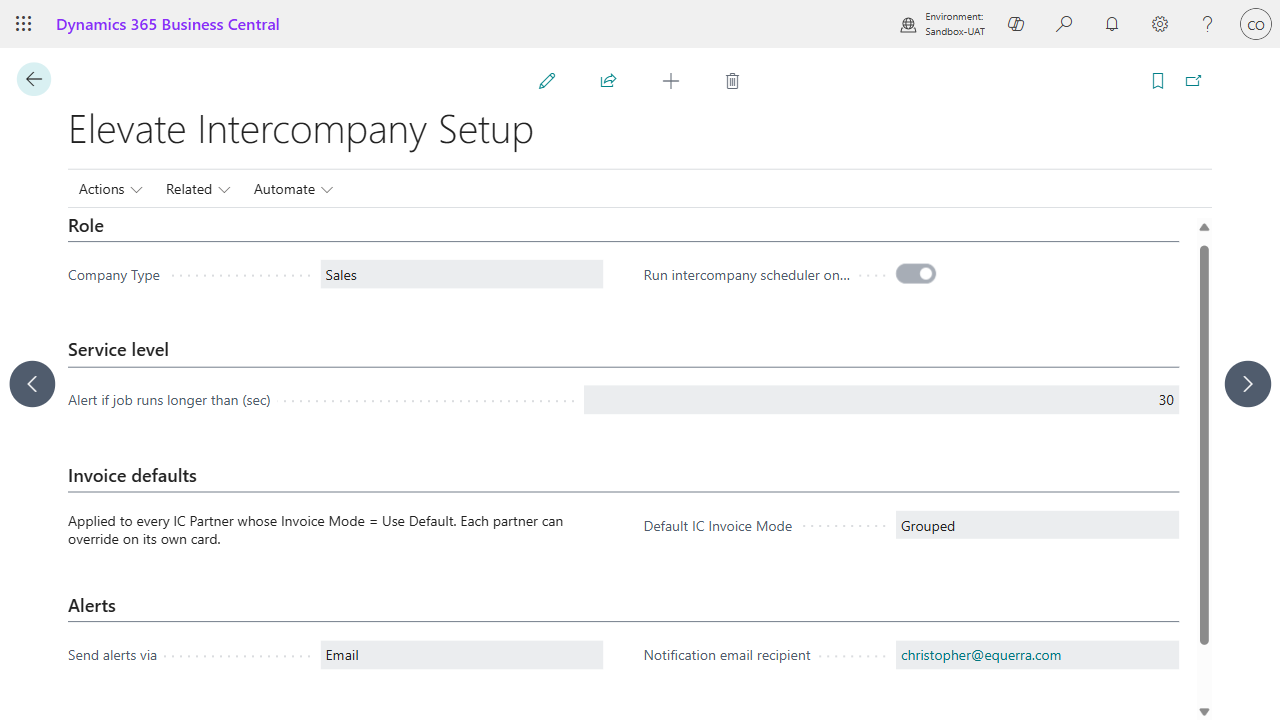
A user creates a sales order on the sales company. When an item has an IC Item Source mapping, the sales order line is automatically tagged with the supply company name. The company's role (Sales or Supply), default invoice mode, and alerting are set once on the Elevate Intercompany Setup card:
-
The user posts a shipment. The extension creates an IC Job of type Shipment and queues it for the supply company.
-
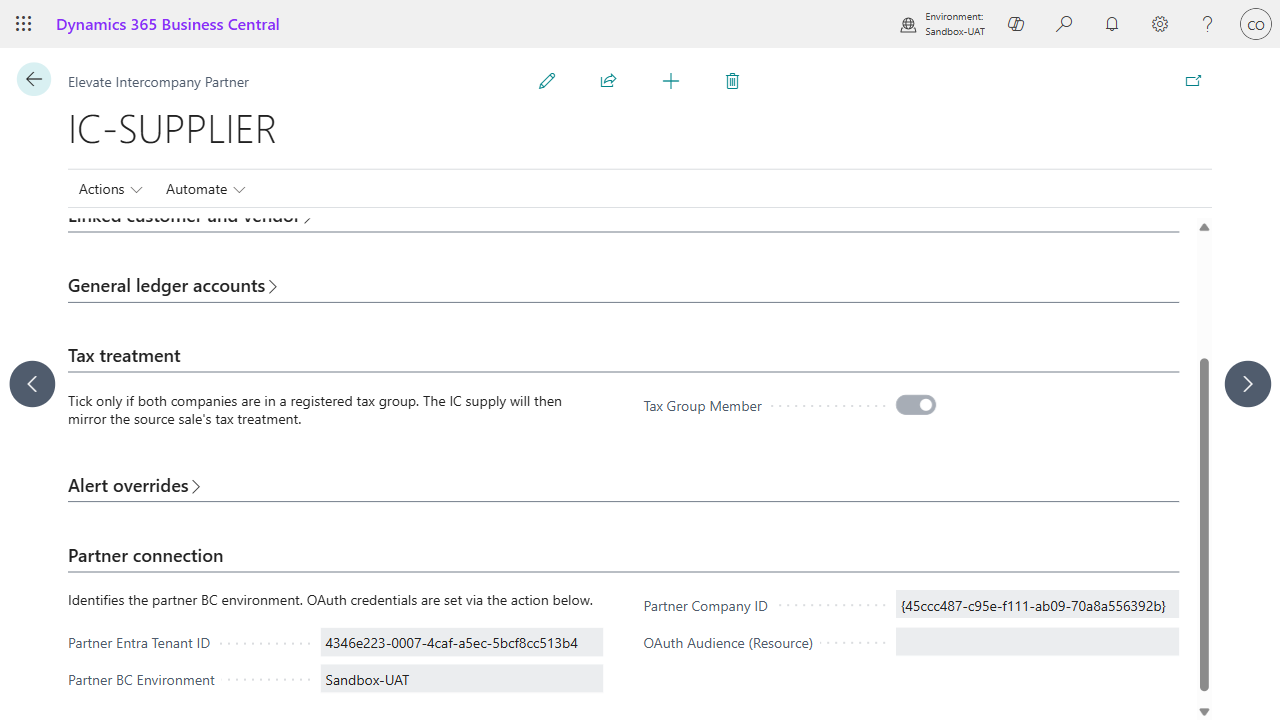
The dispatcher (running on one designated company) picks up the pending job and calls the supply company's API. The supply company creates a matching sales order and posts the shipment against its own inventory. The IC Partner card holds the connection, linked customer / vendor, GL accounts, and tax treatment that the dispatcher uses:
-
The supply company sends back an acknowledgement containing the posted document numbers and the cost of the shipped goods. The sales company records this in an IC Application Link.
-
When the user posts a sales invoice on the sales company, the extension creates an IC Job of type Invoice. In Immediate mode the dispatcher sends it straight away; in Grouped mode it waits for a manual or scheduled batch run.
-
The supply company receives the invoice job, posts a customer ledger entry, and acknowledges. The sales company records a vendor ledger entry to close the loop.
-
If the supply company later adjusts its costs (for example, receiving a revised purchase invoice or an item charge), a Cost Propagation job is sent from the supply company back to the sales company. The sales company updates its item ledger with the cost delta.
-
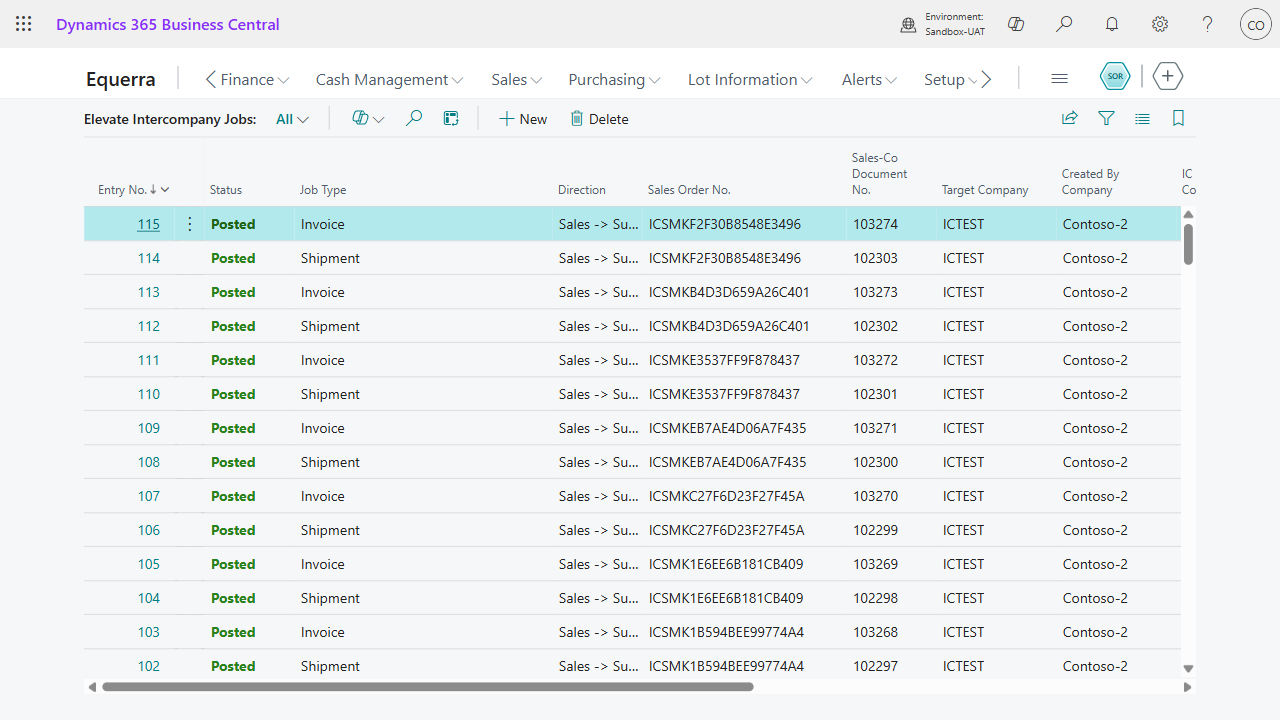
Every dispatched shipment and invoice is visible on the IC Jobs page with its sales-co document, supply-co document, target company, and current status. Failed jobs are retried with exponential backoff; after exhausting retries they move to the Reconciliation Queue for manual investigation, where an operator can Retry or Abandon with an audit reason.
Pages Reference
| Page | Type | Description |
|---|---|---|
| Elevate Intercompany Setup | Card | Central configuration for company type, dispatcher settings, invoice defaults, alert channel, and pause controls. |
| Elevate Intercompany Advanced Settings | Card | Retry tuning and poll cadence settings that most users never need to change. |
| Elevate Intercompany Partners | List | Lists all IC Partner pairings with their status, tax group membership, and supply company name. |
| Elevate Intercompany Partner | Card | Detailed configuration for a single IC Partner including connection details, linked customer/vendor, invoice mode, GL accounts, tax treatment, and alert overrides. |
| Elevate Intercompany Item Sources | List | Maps items to their primary supply company. Supports CSV import for bulk setup. |
| Elevate Intercompany Item Code Map | List | Optional translation of item numbers between sales and supply companies. |
| Elevate Intercompany Jobs | List | Full log of every IC Job in every status, with drill-down to the detail card. |
| Elevate Intercompany Reconciliation Queue | List | Filtered view showing only jobs in Retrying or Failed status for operations triage. |
| IC Recon Detail | Card | Detailed view of a single IC Job with payload, failure history, and Retry/Abandon actions. |
| Attempts (FactBox) | ListPart | Shows the attempt-by-attempt history for an IC Job, including HTTP status and error messages. |
| Elevate Intercompany Application Links | List | Audit trail of every cross-company document pairing with quantities, costs, and FX rates. Supports CSV export. |
| Elevate Cross-Company Cost Chain | Card | Four-node cost lineage view tracing a transaction from the sales-company customer shipment through to the supply-company original inbound entry. |
| Elevate Intercompany Operations Dashboard | CardPart | Cue tiles showing documents posted today, average latency, failure rate, and queue depth. |
| Elevate IC Sales Order Warnings | List | Advisory warnings logged when a sales order is released and the supply company reports low stock or is unreachable. |
| IC OAuth Credentials | StandardDialog | Captures the Entra app Client ID and Client Secret for a partner connection. Values are stored in Isolated Storage. |
| Abandon Reason | StandardDialog | Captures a free-text reason when an operator abandons a failed IC Job. |
| IC RPC API | API | Internal API page that hosts the cross-tenant endpoints used by the dispatcher. Not intended for direct user interaction. |
| IC Daily Reconciliation | Report (Processing Only) | Calculates daily metrics (documents posted, SLA breaches, failures) and sends alerts if thresholds are exceeded. |
Fields Added to Standard Pages
| Page | Field | Location |
|---|---|---|
| Customer Card | IC Partner Customer | End of General group |
| Vendor Card | IC Partner Vendor | End of General group |
| Location Card | IC Eligible | End of General group |
| Item Card | Primary Supply Company | New Intercompany group at the end of the Item group |
| Sales Order Subform | Sourced From Company | After the No. column |
| Posted Sales Invoice | IC Doc Status | New Intercompany group at the end of General group |
| Posted Sales Invoice | IC Job Entry No. | New Intercompany group at the end of General group |
| Posted Sales Invoice | Tax Group Member (snapshot) | New Intercompany group at the end of General group |
Tip: If any of these fields are not visible, use the Personalize action on the page to show or reposition them.
FAQ
Q: Which company should run the dispatcher? Only one company in the group should have Run intercompany scheduler on this company ticked on the Elevate Intercompany Setup page. This is typically the main sales company. All other companies route their jobs through it.
Q: What is the difference between Immediate and Grouped invoice mode? Immediate posts a matching supply-side invoice every time a sales invoice is posted. Grouped queues the invoices until someone runs Post Grouped IC Invoices (from the setup page or the partner card), which consolidates them into a single entry per partner. Choose Grouped when you want to batch invoices on a daily, weekly, or monthly cadence.
Q: Can I mix locally sourced and IC-sourced lines on the same sales order? Yes. Each sales order line has its own Sourced From Company field. Lines left blank are fulfilled locally. Lines with a supply company name are routed through the intercompany pipeline. You can even source different lines from different supply companies.
Q: What happens if the supply company is unreachable when I release a sales order? The extension performs a soft availability check at release time. If the supply company cannot be reached, an advisory warning is logged on the IC Sales Order Warnings page. The release is not blocked. The actual shipment job will retry later through the dispatcher's built-in retry logic.
Q: How do I set up the OAuth connection to a partner? On the IC Partner Card, fill in the Partner Entra Tenant ID, Partner BC Environment, and Partner Company ID. Then click Configure OAuth credentials and enter the Entra app registration's Client ID and Client Secret. Finally, click Test connection to verify the partner is reachable.
Q: What does the Tax Group Member flag do? When ticked on an IC Partner, both legs of the intercompany supply inherit the VAT Product Posting Group from the source sales line. This ensures the intercompany invoice carries the same tax treatment as the original end-customer sale. Leave it unticked if each company should resolve tax independently from its own VAT Posting Setup.
Q: How do I handle a failed IC Job? Open the Reconciliation Queue page. Review the error message on the failed job. Fix the underlying issue (for example, correct a missing setup on the partner company), then click Retry on the IC Recon Detail card. If the job is no longer relevant, click Abandon and provide a reason for the audit trail.
Q: What is a Hybrid company and when should I use it? A Hybrid company acts as both a sales company and a supply company. You need the Elevate IC - Hybrid Company permission set to enable this. Use it only when the same company genuinely sells to end customers and also fulfils orders for other group companies.
Q: Can the sales and supply companies use different item numbers? Yes. Open the Item Code Map page and create a mapping row for each partner and item pair. The extension translates item numbers automatically during dispatch.
Q: How does cost propagation work? When the supply company's costs change (for example, after receiving a revised purchase invoice or posting an item charge), a Cost Propagation IC Job is sent back to the sales company. The sales company updates its item ledger entries with the cost delta so that its cost of goods sold reflects the true landed cost from the supply company.
Q: How do I pause intercompany sync during maintenance? On the Elevate Intercompany Setup page, fill in a Pause Reason and tick Pause intercompany sync. New jobs will continue to queue but will not be dispatched. Clear the tick to resume processing.
Q: Where can I see an end-to-end cost trail for an IC transaction? Open a Posted Sales Invoice that was IC-sourced and click the Cross-Company Cost Chain action. This opens a four-node view showing the sales-company outbound entry, sales-company inbound entry, supply-company outbound entry, and supply-company original inbound entry, along with applied costs and exchange rates.
Troubleshooting
| Issue | Resolution |
|---|---|
| Test connection on the IC Partner Card returns HTTP 401 | The OAuth token was acquired but Business Central rejected it. On the partner company, search for Users, ensure an Application user exists with the Application ID matching the Entra app, and assign it the Elevate Intercompany - Ops permission set. |
| Test connection returns HTTP 404 | The URL does not resolve. Verify Partner BC Environment and Partner Company ID on the IC Partner Card. Both must match the partner exactly. Also confirm the extension is installed on the partner company. |
| Sales order line Sourced From Company is not editable | The line is source-locked because the order has been released. Reopen the order to unlock the sourcing fields, make changes, and release again. |
| IC Jobs are queuing but not being dispatched | Check that exactly one company has Run intercompany scheduler on this company ticked and that its Job Queue Entry is active. Also confirm Pause intercompany sync is not ticked on the setup page. |
| Post Grouped IC Invoices posts zero invoices | No pending Invoice IC Jobs exist for partners in Grouped mode. Verify that the partner's IC Invoice Mode is set to Grouped (or to Use Default with the company default set to Grouped), and that sales invoices have been posted for IC-sourced orders. |
| IC Job is stuck in Retrying status | Open the job on the IC Recon Detail page and review the Last Error Message. Common causes include a missing customer/vendor on the partner company, posting setup gaps, or a permissions issue on the partner's Application user. Fix the root cause and click Retry. |
| The IC Partner Customer or IC Partner Vendor field is not visible on the Customer/Vendor Card | Use the Personalize action on the page to show the field. It is added to the end of the General group and may be hidden by default. |
| Cost Propagation job fails with a posting error | The sales company's item ledger entry may already be closed or adjusted. Check that the IC Application Link for the affected document is in Shipped or Invoiced status (not Reversed). If the link has been manually abandoned, cost propagation cannot be applied. |
| Cannot set Company Type to Hybrid | The user must have the Elevate IC - Hybrid Company permission set assigned. This is an intentional gate to prevent accidental misconfiguration. |
| Pause intercompany sync cannot be ticked | Fill in the Pause Reason field first. The extension requires a reason before allowing dispatch to be paused, ensuring the audit trail records why sync was stopped. |