Hierarchy Examples
The following examples show the four hierarchy types that Elevate Dimensions supports. Each uses dimensions you might recognise from a typical organisation: Region, Division, Department, Team, and Employee.
1. Balanced Hierarchy
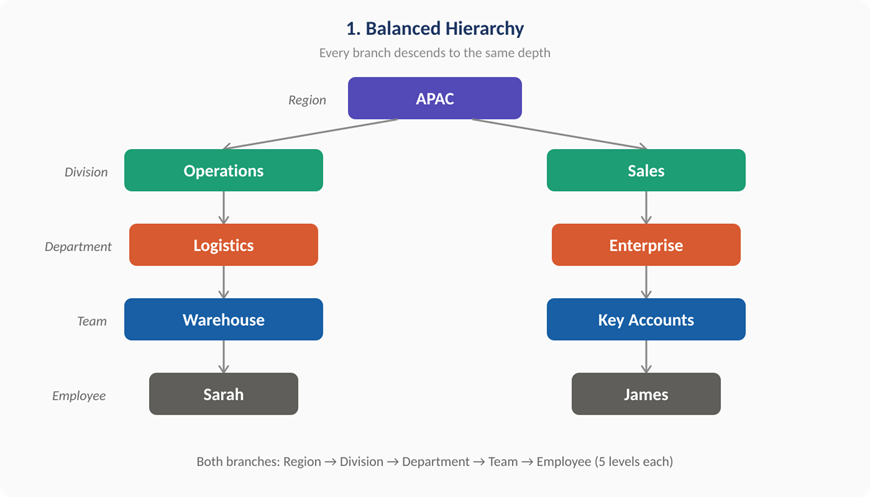
Every branch descends to the same depth. When a user enters an Employee value, the extension cascades all the way up through Team, Department, Division, and Region.
Setup rules:
| Child Dimension | Child Value | Parent Dimension | Parent Value |
|---|---|---|---|
| Employee | Sarah | Team | Warehouse |
| Team | Warehouse | Department | Logistics |
| Department | Logistics | Division | Operations |
| Division | Operations | Region | APAC |
| Employee | James | Team | Key Accounts |
| Team | Key Accounts | Department | Enterprise |
| Department | Enterprise | Division | Sales |
| Division | Sales | Region | APAC |
At runtime: A user enters Employee = Sarah on a sales order line. The extension automatically fills in Team = Warehouse, Department = Logistics, Division = Operations, and Region = APAC - all without any manual entry.
2. Ragged Hierarchy
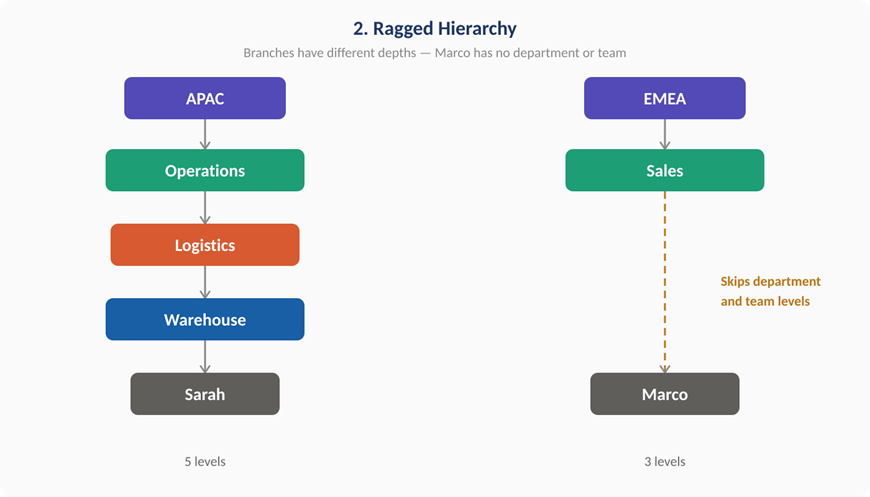
Branches have different depths. Some child values cascade through every level, while others skip intermediate levels entirely.
Setup rules:
| Child Dimension | Child Value | Parent Dimension | Parent Value |
|---|---|---|---|
| Employee | Sarah | Team | Warehouse |
| Team | Warehouse | Department | Logistics |
| Department | Logistics | Division | Operations |
| Division | Operations | Region | APAC |
| Employee | Marco | Division | Sales |
| Division | Sales | Region | EMEA |
At runtime: Entering Employee = Sarah cascades through all five levels as before. Entering Employee = Marco skips Department and Team entirely, setting only Division = Sales and Region = EMEA. This is useful when some employees report directly to a division without belonging to a specific department or team.
3. Unbalanced Hierarchy
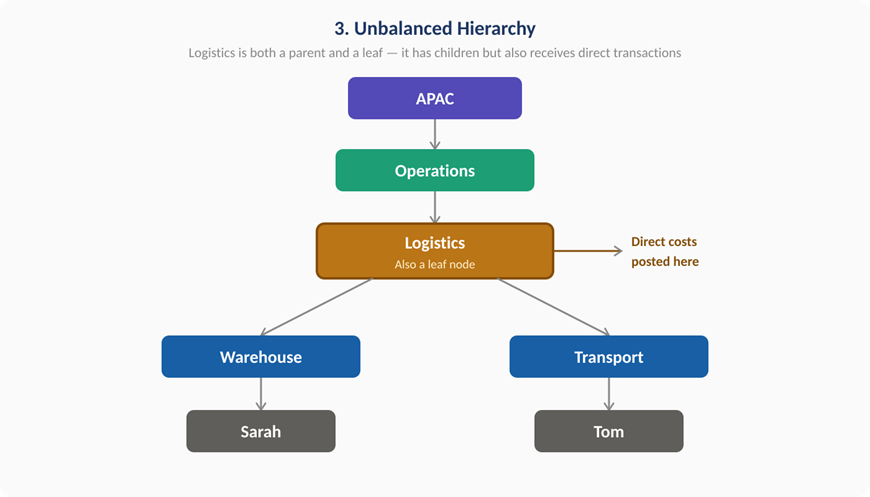
A dimension value acts as both a parent and a leaf. In this example, Logistics has child teams (Warehouse, Transport) but also receives direct transactions itself.
Setup rules:
| Child Dimension | Child Value | Parent Dimension | Parent Value |
|---|---|---|---|
| Employee | Sarah | Team | Warehouse |
| Employee | Tom | Team | Transport |
| Team | Warehouse | Department | Logistics |
| Team | Transport | Department | Logistics |
| Department | Logistics | Division | Operations |
| Division | Operations | Region | APAC |
At runtime: Entering Employee = Sarah cascades to Team = Warehouse, Department = Logistics, Division = Operations, Region = APAC. But a user can also enter Department = Logistics directly (for example, to post a direct cost to the department) and the extension fills in Division = Operations and Region = APAC without requiring a Team or Employee value.
4. Multi-Parent Hierarchy (DAG)
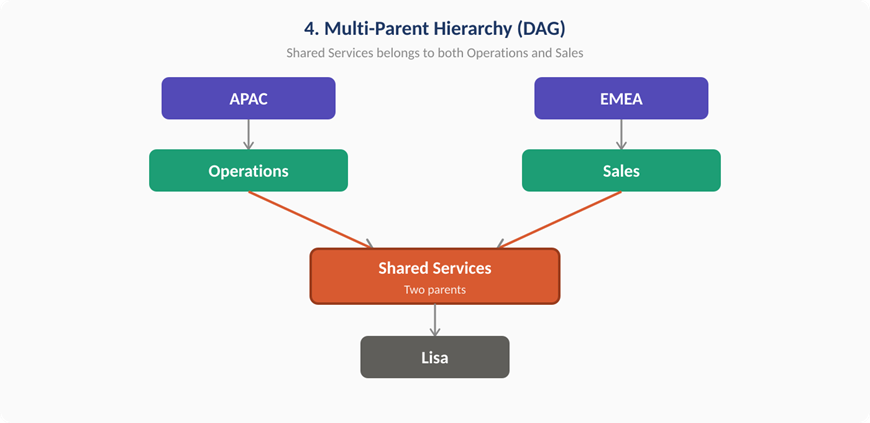
A single child value maps to more than one parent value for the same parent dimension. The user is prompted to choose at runtime.
Setup rules:
| Child Dimension | Child Value | Parent Dimension | Parent Value | Hierarchy Type |
|---|---|---|---|---|
| Department | Shared Services | Division | Operations | Multi-Parent |
| Department | Shared Services | Division | Sales | Multi-Parent |
| Division | Operations | Region | APAC | Standard |
| Division | Sales | Region | EMEA | Standard |
At runtime: A user enters Department = Shared Services on a journal line. Because two Division values exist (Operations and Sales), a selection page appears asking the user to choose. If they select Operations, the extension then cascades Region = APAC. If they select Sales, the extension cascades Region = EMEA.